Short answer
An exit-intent popup is a window that opens when a visitor on a computer moves the cursor out of the page towards the tab bar or the close button, and it asks one question before the visit ends. It works only with a mouse: a phone has no cursor, so there is nothing to detect.
Example: a visitor reads your price list for two minutes, moves the cursor to the top and sees “Leaving already? Ask us one question.”
Key takeaways
- The popup reacts to the cursor leaving the page, so it appears on desktop and never on a phone. If most of your visitors are on mobile, it will reach few of them.
- Ask one question and ask for one contact. Long forms make people close the window.
- Show it once. In askbox the window appears at most once per page load and never while the chat is open.
What an exit-intent popup is
In practice, an exit-intent popup is a short message that appears at the moment a person looks ready to leave, with one or two buttons and sometimes a field for a phone number or an email.
The page cannot see the person’s mind. It sees the pointer: when the cursor leaves through the top edge of the page, the script guesses the visitor is heading for the tab bar or the back button. The guess is sometimes wrong, because people also move the mouse up to reach a bookmark or a menu.
On a touchscreen there is usually no pointer, so there is no exit signal. A tool that claims to detect “intent to leave” on a phone is usually guessing from scrolling or a timer, which is a different and more intrusive trick. Plan your exit message for desktop visitors only.
Exit-intent popup versus an annoying popup
The difference is timing and size. An annoying popup covers the page the moment it loads, hides the text the visitor came to read and asks for an email before they have learnt anything. An exit-intent window waits until the visit is ending, so it interrupts far less.
| Aspect | Intrusive popup | Polite exit window |
|---|---|---|
| When it appears | Seconds after the page loads | When the cursor heads for the tab bar |
| What it covers | The whole page, often with a dark overlay | A small box, the page stays readable |
| What it asks | An email, a discount code, a survey | One question that matches the page |
| How often | On every page, on every visit | Once, then silence |
| How to close it | A tiny cross, or a guilt-trip button | A plain “No, thanks” beside the main button |
A window that appears on load is a different matter from one that appears on exit, and search engines have their own rules for popups that cover content when a page opens. Check the current guidance for your search engine before you add anything that shows on load; the exit window below does not.
Myth
An exit-intent popup works on mobile too.
Fact
No. A phone has no cursor, so there is no exit signal to detect. Plan it for desktop visitors.
Myth
An exit-intent popup is always annoying.
Fact
It is when it asks for several things, covers the page or keeps coming back. One short question with a plain “No, thanks” button rarely bothers anyone.
8 exit-intent popup examples to copy
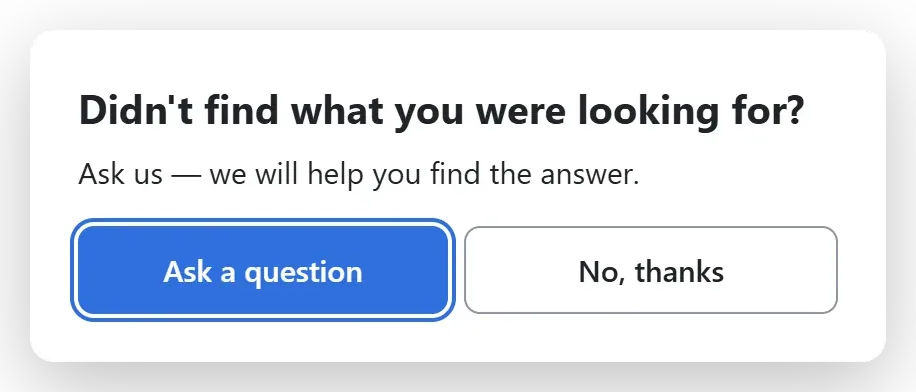
These are example texts written for this guide, not results from any site. Each has a title, one line of text and two buttons. Replace the brackets with your own details and cut any word that does not fit your business.
All eight do the same three things: they name a situation the visitor may recognise, offer one next step, and keep the refusal button as plain as the main one.
How to create an exit-intent popup
How to create an exit-intent popup depends on your tool, but the work is always the same four steps.
Pick one page and one goal
Start with the page where visitors read prices or services and leave without writing, such as a pricing page or a service description. One page, one question.
Write the title, the text and two buttons
Use the examples above. Keep the title short and make the second button an honest “No, thanks”.
Decide what happens on a click
The main button can open a chat, a short form or a callback request. Ask for a phone number or an email, not both.
Install it and test on your own computer
Open the page, move the cursor up through the top edge and see if the window appears. Then check it does not return after you close it.
In askbox the exit-intent popup is part of the widget you install with one line of code. You write the title, the text and both buttons in the panel, and the first button opens your scripted chat. The window appears at most once per page load and never while the chat is open. You can switch it off for the whole project or for pages that match a display rule.
Four rules so it does not irritate
Run your own window through these four checks before you publish it.
- One question. “Want a price?” works. “Want a price, a newsletter and a brochure?” does not.
- One contact. If the next step asks for a phone number, do not ask for an email in the same step. The chatbot in askbox lets the visitor pick a phone call or an email and then asks for that one.
- Once. In askbox the window appears at most once per page load and never while the chat is open; switch it off on pages where it should not appear, for example a thank-you page.
- Match the page. A question about prices belongs on the price page, a question about dates on the booking page.
The first and the last rule are the easiest to break. Here is how they look in a text.
Before
Want a price, a newsletter and a brochure?
After
Want a price?
Before
Wait! Don’t go!
After
Not sure what it will cost? (on the price page)
Test your own site on a laptop before you publish. If the window feels pushy to you, it will feel pushy to a stranger who has never heard of you.
Who an exit window suits
Good fit if you…
- Your analytics show mostly desktop visitors, for example on B2B services, clinics, rental and repair sites with a long service page.
- You can answer a question or call back within a working day.
- You want one phone number or one email, not a mailing list.
Skip it if you…
- Most of your traffic is on phones. The exit window will rarely appear there.
- You want the window to adapt its text to the page by itself. askbox does not do that: the texts are yours, and leads go to email and the panel, not to a CRM.
Pair the window with a short script behind it. If the visitor clicks, the first button opens the chat, where the visitor can request a callback. For how a callback differs from a plain phone link, see this guide to click-to-call.
Questions about exit-intent popups
What is an exit-intent popup?
A window that opens when the cursor moves out of the page towards the tab bar, so it asks one question just before a desktop visitor leaves.
Does an exit-intent popup work on mobile?
No. A phone has no cursor, so there is no exit signal to detect. Plan it for desktop visitors.
How many times should the popup show?
Once is enough. In askbox the window appears at most once per page load and never while the chat is open; you can switch it off on pages where it should not appear.
Is an exit-intent popup annoying?
It is when it asks for several things, covers the page or keeps coming back. One short question with a plain “No, thanks” button rarely bothers anyone.
What should the popup ask?
One question that matches the page: a price on a pricing page, a date on a booking page. The examples in this guide are a starting point.
Ask your one question before the visitor leaves
Write the title, the text and two buttons in the panel, install one line of code and test it on your own computer.
Start free trialFree for your first 10 leads · spam caught by the system costs €0 · leads stored in the EU