Short answer
Click-to-call is a link or button on a website that starts a phone call when the visitor taps it, so nobody has to copy and dial the number. The simplest version is one line of HTML, a tel: link, and it works well on a phone and often does nothing on a computer.
Example: a plumber’s site shows a green “Call now” button; a visitor on a phone taps it and the dialler opens with the number filled in.
Key takeaways
- There are three versions: a
tel:link, a “Call” button that uses the same link, and a callback form where the visitor leaves a number and picks an hour. - A
tel:link is free and takes a minute to add, but on a computer it often does nothing. Always show the number as text as well. - A callback form fits visitors on computers and people who cannot talk now, but it only works if you really call back at the hour they chose.
What is click to call?
In plain terms, click-to-call is a shortcut from reading to talking. The visitor sees your number, taps it, and the phone starts the call.
Two directions exist, and they get mixed up. In the first, the visitor calls you: the site gives them a number to tap. In the second, you call the visitor: they leave a number and you ring them. A callback form is the second kind. Both are called click-to-call in different guides, so check which one a tool means before you buy it. Four terms are enough to follow the rest of this guide:
- Click-to-call
- A page element that starts a phone call when the visitor activates it, either from the visitor’s phone to you or, with a callback form, from you to the visitor.
tel:link- An ordinary link whose address starts with
tel:followed by the number. On a phone, a tap opens the dialler with the number ready. - International format
- A plus sign, the country code and the digits, with no spaces or brackets.
- Callback form
- The visitor types a phone number and picks a time, and you call them.
Three ways to put it on a site
All three start a conversation from the page. They differ in who dials and in how much the visitor has to do.
1. A tel: link
Costs nothing
The phone number is written as a link. On a phone, a tap opens the dialler with the number ready. This is the simplest choice.
2. A call button
The same tel: link, styled as a button and placed where a visitor decides: the header, the end of a service page, a floating button in the corner of the screen. The button does not add a feature, it makes the link easy to find with a thumb.
3. A callback form
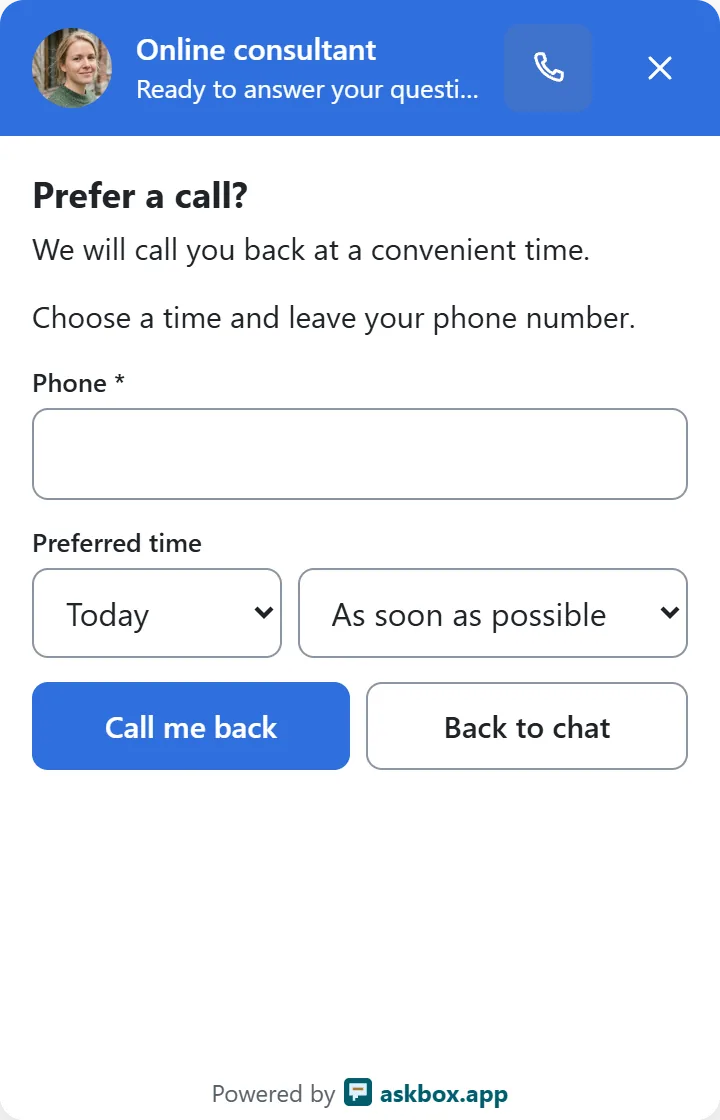
The visitor types a phone number and picks a time, for example “today at 15:00”, and you call them.
In askbox the callback widget offers today or tomorrow and a specific hour or “as soon as possible”, and the request arrives by email and in the panel, marked as a callback lead.
How it looks to the visitor and to you
The three versions differ most in what you know afterwards.
| Version | The visitor | You |
|---|---|---|
tel: link | Taps the number, the phone dials | Your phone rings; you do not see who clicked or from which page |
| Call button | Taps a visible button anywhere on the page | Same as the link: a ringing phone, no record |
| Callback form | Types a number, picks an hour, closes the page | An email and a card in the panel with number, hour and page; you call at that hour |
With a link or a button, the call is a conversation the moment it connects, and a missed call leaves only a number in your call log. With a form, you have the number, the hour and the page the visitor was reading before you pick up, which helps you open the conversation with something relevant.
How to add a tel: link
A tel: link is an ordinary link, and adding one takes about a minute. Paste it where the number appears on your site.
Write the number in international format
Use a plus sign, the country code and the digits, with no spaces or brackets.
Put it in a link that starts with tel:
The number in this example is a placeholder from a range reserved for TV and drama, so replace it with yours.
<a href="tel:+442079460000">Call us: +44 20 7946 0000</a>Keep the readable number as the link text
Write it with spaces, so a visitor on a computer can read it and dial it on their phone.
Checklist after you add it
- Open the page on your own phone and tap the link. The dialler should open with the full number, including the country code.
- Open it on your computer. Note what happens: a prompt asking which app to use, a softphone starting, or nothing.
- Make the link text large enough for a thumb, and check it is not too close to another link.
- If the site is built in a page builder, look for a field named “phone link” or “button URL” and enter
tel:followed by the number there.
A tel: link opens whichever app your computer has registered for phone numbers, such as a softphone or a video-calling program. Often a computer has none, so the click does nothing or shows an error. This is why the number must also be visible as plain text.
Button or callback form
Choose the button if your visitors are mostly on phones and someone answers during opening hours. Choose the callback form if visitors read your site at a desk or in the evening, or if they ask about something they would rather explain in their own words and in their own time.
Callback form: pros
- +Works on a computer, where a
tel:link often does nothing. - +The visitor picks an hour, so you call when they can talk.
- +You get the number and the page, even if the visitor never speaks to you.
- +Out-of-hours visitors can leave a request instead of hearing a ringing phone.
Callback form: cons
- −You must call back at the chosen hour. A missed hour costs you the trust the form was supposed to earn.
- −One more step than a tap: the visitor must type a number.
- −Some visitors leave a wrong number or give up halfway.
- −You still make the call yourself.
In askbox you call from your own phone: the widget does not dial or connect the call. A form turns one person’s sudden wish to call into a plan, and a plan needs someone to keep it. If you cannot promise to call back within the hour chosen, offer a button for opening hours and tell visitors when you answer.
Prefer a form to a ringing phone? See the callback widget
Who each version suits
The callback form is the version with conditions attached, so the test is whether you can meet them.
Callback form suits you if you…
- take calls until a fixed hour, say 18:00, and can ring back the same day.
- have visitors on computers, for example from search or advertising.
- want to know which page the request came from.
Skip the callback form if you…
- cannot call back at a fixed hour. A plain
tel:link is the simpler choice. - need a service that dials the visitor and connects the call for you. askbox has a callback request form, not telephony.
- need requests to land in a CRM or Telegram. At launch, leads go to email and the panel only.
If you want a window to appear at the moment a desktop visitor is leaving, the exit-intent popup has a main button that opens the chat, where the visitor can ask for a callback; see exit-intent popup examples for texts.
Questions about click-to-call
What is click-to-call?
A way for a visitor to start a phone call from your website with one tap or click, usually through a tel: link or a callback form.
How do I add click-to-call to my website?
Make the number a link that starts with tel: followed by the number in international format, and keep the readable number as the link text.
Why does a tel: link not work on my computer?
A computer needs an app registered for phone numbers. Often it has none, so the click does nothing. Show the number as text too.
Does a callback form call the visitor for me?
No. In askbox the widget sends you the number and the hour, and you call from your own phone.
Is a callback request counted as a lead?
In askbox a callback request with a phone number is a lead and is billed like any other lead: €9.50 a month + €0.99 down to €0.20 per lead, VAT extra. Check the pricing page for the current rates.
Let visitors choose the hour you call back
Add one line of code, switch on the callback form and receive the number, the hour and the page by email and in the panel.
Start free trialFree for your first 10 leads · spam caught by the system costs €0 · leads stored in the EU