A website chatbot that follows your script and brings you contacts
The askbox chatbot follows a script you write: a greeting, the visitor’s question, a choice between phone and email, and the contact. The lead arrives in your inbox and in the panel with the page, UTM tags and device.
- Free for your first 10 leads
- You write every message; AI is optional and off by default
- No cookie before the first action
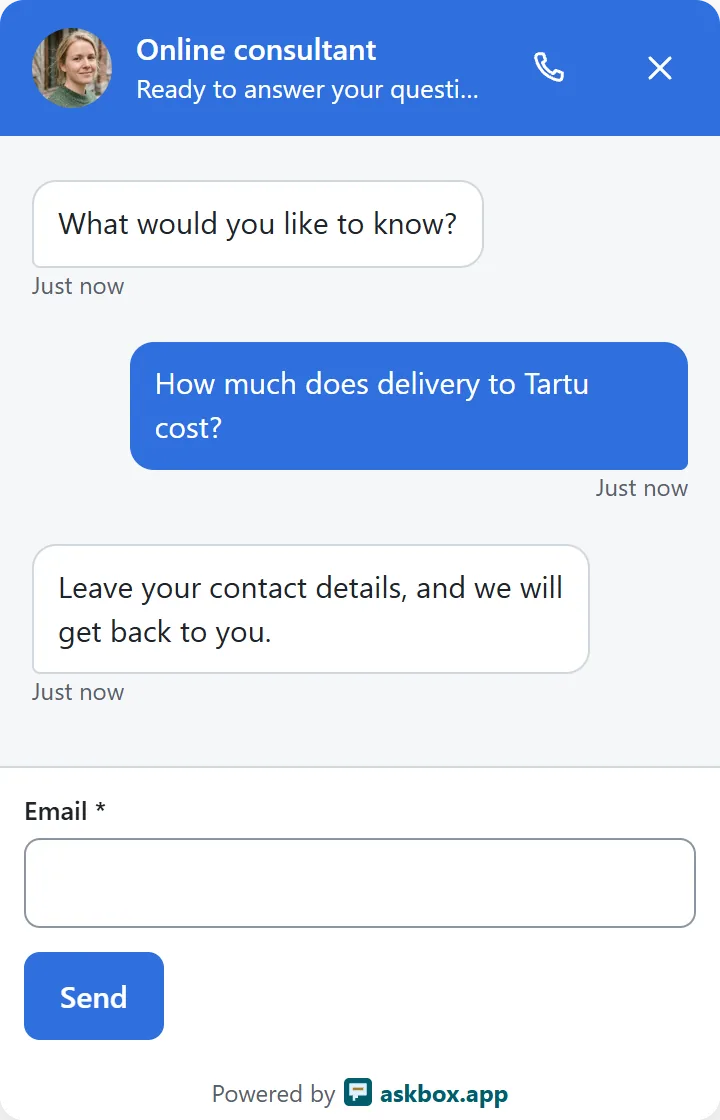
How the bot talks to a visitor
Five steps on the visitor’s side. Every message and every pause is yours to set.
- 1
Waits, then shows the button
The widget waits for the delay you set in the panel, then shows the button.
- 2
Greets
Your automatic messages appear one by one, each with its own typing pause.
- 3
Takes the question
The visitor types the question in their own words; you set the minimum length.
- 4
Asks for contact details
The visitor chooses phone or email and enters it in the same window. Name and city are optional fields you turn on.
- 5
Sends you the lead
An email to every address on your list and a card in the panel with the page, UTM tags and device.
What you set in the panel
Everything below is configured per project at app.askbox.app.
Messages and pauses
Automatic messages, the question prompt, the thank-you and the line that encourages the visitor to leave their contact details.
Delay and mobile version
Seconds before the button appears. The mobile version has its own delay, design and texts.
Fields
Phone or email always; name and city only if you turn them on.
Profiles and display rules
Different scripts for different pages. A rule matches the URL by “contains”, “starts with”, “equals” or a regular expression.
Notifications
Any number of recipients; you choose whether the email shows the phone, email, page address and UTM tags.
Analytics events
Events named
askbox_*go to GA4, Yandex Metrica and the GTM dataLayer if those analytics tags are on the page. The widget does not load any analytics scripts itself.
Who the chatbot suits and who it does not
Suits
- Service businesses where people ask before they buy: repairs, clinics, delivery, rentals.
- Businesses that just need a phone number or an email, not a long conversation.
Does not suit
- You want an AI that runs whole conversations or takes actions on its own. The bot follows your script; the optional AI consultant only answers from your own site and your own answers and offers an operator or the lead form (contact details) when it does not know.
- You need leads in a CRM, Telegram or a webhook. At launch, leads go only to email and the panel.
Chatbot questions
Does the chatbot use AI?
Not by default: the bot follows the script you write and every answer comes from you. The optional AI consultant is off until you switch it on. Where it is on, an AI answers visitors’ questions from your own site and your own answers, labels every answer as AI, gives a link to the page when the visitor asks for one and offers an operator or the lead form (contact details) when it does not know. Questions and page texts are then processed outside the EU; the privacy policy names the providers.
What counts as a lead?
A visitor who leaves a phone number or an email. A chat without contact details is not a lead and is not billed.
How much does it cost?
€9.50 a month plus a price for each lead, from €0.99 down to €0.20; the widget is free for your first 10 leads. Prices exclude VAT; 24% Estonian VAT is added.
Which languages does the bot speak?
The widget interface is available in 21 languages. Automatic messages and questions are texts you write; the panel can translate them for you on request.
How do I install it?
Paste one line before the closing body tag. The WordPress install guide shows it step by step.
Put a chatbot on your site today
Start free trial Free for your first 10 leads · spam caught by the system costs €0 · leads stored in the EU