Short answer
Most good scripts for a small business follow one shape: a greeting of one or two lines, one question about what the visitor needs, a request for a phone number or an email, and a thank-you with a time. Below are eight scripts for repairs, a clinic, flowers, rentals, a car service, a lawyer, courses and a salon.
The whole shape in four lines: “Hi! We repair phones and tablets.” / “Which phone model is it?” / “By phone or by email?” / “Thanks! We will send a price by 18:00 today.”
Key takeaways
- Each script has the same five parts: goal, greeting, question, contact request, thank-you.
- Copy the structure and replace the words with the questions your own customers ask.
- These scripts collect contacts. The bot follows the script and does not answer questions by itself.
Eight web chatbot examples at a glance
This table lists what each script is for and what it asks first. The scripts that follow show the full wording.
| Business | Goal of the bot | First question |
|---|---|---|
| Phone repair shop | Get a quote request | Which phone model is it? |
| Private clinic | Request a booking | Which doctor or service would you like to book? |
| Flower delivery | Take a rush order | Which day should the flowers arrive? |
| Equipment rental | Check availability | What would you like to rent? |
| Car service | Get a visit request | What car is it? |
| Lawyer | Get a first reply | What is your question? A line or two is enough. |
| Course provider | Send the programme | Which course interests you? |
| Beauty salon | Fill a free slot | Which service would you like? |
Every business, name and time below is made up for illustration. They are not clients of askbox, and no results are claimed for any of them.
Chatbot website examples: eight scripts from repairs to a salon
Open one script at a time. Each has the same five parts, from the goal to the thank-you, and together they cover a repair shop, a clinic, flowers, a rental, a car service, a lawyer, courses and a salon.
Phone repair shop
- Goal: a visitor with a broken phone leaves a number so you can quote.
- Greeting: “Hi! We repair phones and tablets.”
- Question: “Which phone model is it?”
- Contact request: “Where shall we send the price? By phone or by email?”
- Thank-you: “Thanks! We will send a price by 18:00 today.”
Private clinic
- Goal: a booking request for a first consultation, confirmed by a person.
- Greeting: “Hello! We can help you book a visit.”
- Question: “Which doctor or service would you like to book?”
- Contact request: “Phone or email? Our receptionist will contact you to agree a time.”
- Thank-you: “Thank you. Our receptionist will contact you within one working day to agree a time.”
Flower delivery
- Goal: an urgent order from a visitor who has little time.
- Greeting: “Hi! Need flowers delivered in [city]?”
- Question: “Which day should they arrive?”
- Contact request: “Leave a phone number and we will confirm the bouquet in 15 minutes.”
- Thank-you: “Thanks! We will call you in about 15 minutes.”
Equipment rental
- Goal: find out whether the item is free on the dates.
- Greeting: “Hi! Looking to rent something?”
- Question: “What would you like to rent? Please add the dates.”
- Contact request: “We will check and reply. Phone or email?”
- Thank-you: “Thanks! We will tell you today whether it is free on those dates.”
Car service
- Goal: a visit request instead of an unanswered phone.
- Greeting: “Hello! Is your car making a noise or showing a warning light?”
- Question: “What car is it?”
- Contact request: “Phone or email? We will suggest a day.”
- Thank-you: “Thank you. We will contact you before 10:00 tomorrow with a day for the visit.”
Lawyer
- Goal: a first reply by phone or email, with no documents sent through the chat.
- Greeting: “Hello. This chat is for a first question to a lawyer.”
- Question: “What is your question? A line or two is enough. Do not send documents here.”
- Contact request: “Phone or email for the reply?”
- Thank-you: “Thank you. A lawyer will reply within two working days. This is not legal advice.”
Course provider
- Goal: send the programme and the next start date.
- Greeting: “Hi! Want to see the programme?”
- Question: “Which course interests you?”
- Contact request: “Where shall we send the programme? Email is fine.”
- Thank-you: “Thanks! The programme will arrive in your inbox today.”
Beauty salon
- Goal: fill a slot that is still free this week.
- Greeting: “Hi! We have free slots this week.”
- Question: “Which service would you like?”
- Contact request: “Phone or email, and your first name? We will agree a day and time.”
- Thank-you: “Thanks, [first name]! We will confirm by message within an hour during opening hours.”
One of the eight needs a precaution before you copy it: the private clinic.
The askbox data processing agreement says the service is not meant for special categories of data and that the client shall not ask visitors for them in widget texts. Health information is such data under the GDPR, so this script asks only which doctor or service, and the details stay for the call.
Greetings and thank-yous to copy
In the window, the greeting and the first question appear as chat messages, one after the other.
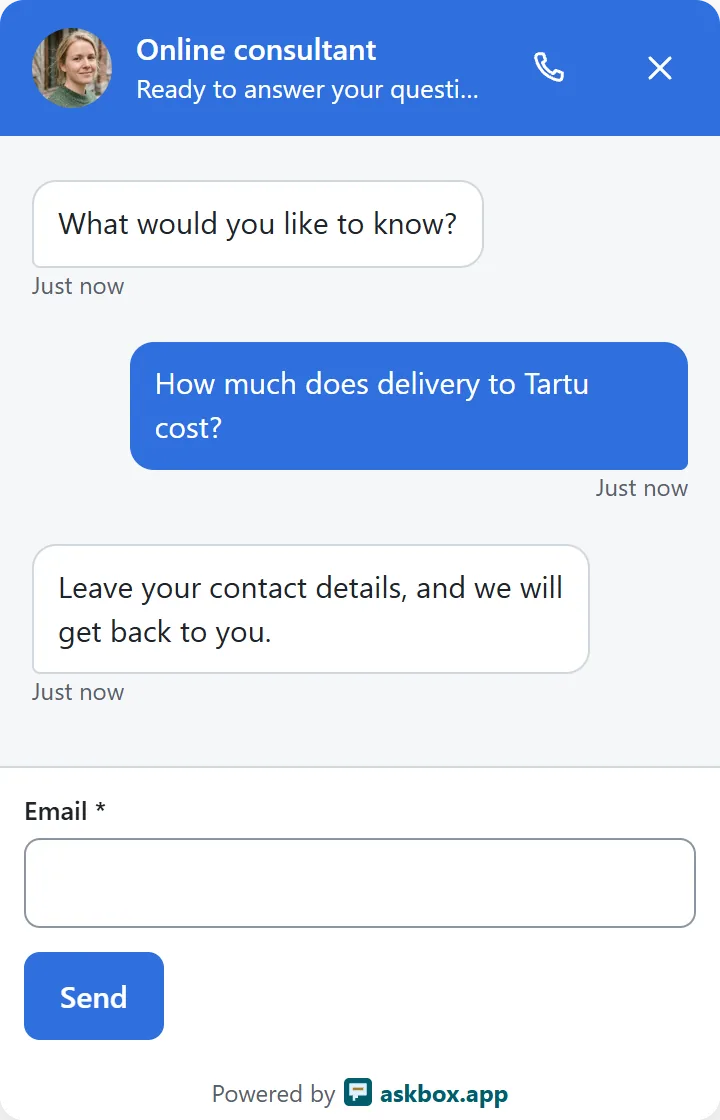
Four greetings that fit a first message of one or two lines:
And four thank-yous, each promising a time you can keep:
Adapting a script for customer service
A chatbot customer service example looks the same as the sales scripts, with one difference: the visitor already has an order. A flower shop could ask “Which order is it? Type the number, for example [order no.].” and then “Where should we answer, by phone or by email?”
Myth
A customer service bot looks up the visitor’s order.
Fact
askbox does not connect to your order system. It collects the question and the contact, and a person on your side answers.
If you need a chat that checks orders by itself, this is the wrong tool.
How to turn an example into your script
Copying is the easy half; editing is the point. The before and after for one of these scripts shows it:
Before
Welcome! Please fill in the form and our team will get back to you.
After
Hi! Which service would you like?
Three steps take an example to your own script:
Pick the closest example
Pick the example closest to your business and copy its five parts into a note.
Replace the question
Replace the question with the one your customers ask most often. Check your last 20 enquiries.
Enter the texts
Enter the texts in the panel and set the button delay.
Before you switch the script on, check each line:
- Each greeting is two messages of about 10 words.
- Every promise in the thank-you is a time you can keep.
- No message asks for documents or health details in the chat.
- You tested the widget on a phone.
The rules behind these scripts are in chatbot best practices. To see what the widget does on a visitor’s screen, read about the askbox chatbot, and if some visitors prefer to talk, the callback widget takes a number and an hour.
Good fit if you…
- You run a service business where people ask first and buy later.
- You want a phone number or an email, and you will answer yourself.
Skip it if you…
- You want a bot that books, pays or looks up orders. askbox has none of that.
- You need leads in a CRM or Telegram. At launch they go to email and the panel.
Have your script ready? Enter it in askbox
Questions about chatbot examples
Are these real customer cases?
No. No company in them is a client, and no results are claimed.
Can I copy these chatbot scripts?
Yes. Copy the wording, replace the question and the times with your own, and enter the texts in the panel.
Does the bot answer the visitor’s question?
Not by default. It follows the script you write, collects the question and a contact, and you reply. The optional AI consultant, which answers from your own site, is off until you switch it on.
What does a lead cost with a script like this?
A lead is a visitor who leaves a phone number or an email. The widget is free for the first 10 leads; the current prices are on the pricing page.
Which are the best chatbot examples for a one-person business?
Phone repair: it asks one question and the thank-you promises a reply the same day. One question and one contact fit a team that answers within a day.
Turn one of these scripts into your own
Enter the greeting, the question and the thank-you in the panel and paste one line of code on your site. The widget is free for your first 10 leads.
Start free trialFree for your first 10 leads · spam caught by the system costs €0 · leads stored in the EU